
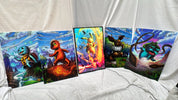
16×24 Movie Poster Lightbox Guide: Size, Inserts & Lighting
, 1 min reading time
, 1 min reading time
Choose a 16×24 movie lightbox by insert size, transparency, frame dimensions, lighting modes, and safe cable placement.
A 16×24 lightbox can make a compact home-theater display, but the frame and insert must be designed to work together. Start with the artwork's dimensions and light transmission before comparing brightness or price.
The outer frame takes up more wall space than the insert. STG's current frame listing gives an 18×26-inch exterior for a 16×24-inch panel. Measure the wall using the exterior dimensions and leave room to open the frame and route its cable.
Do not assume a theatrical poster will fit: common movie-poster dimensions differ. Cropping can remove credits, faces, or title lettering. Choose an appropriately sized image or ask about a permitted custom print before ordering.
The STG 16×24 acrylic LED lightbox frame is intended for translucent acrylic or backlit film. Ordinary opaque paper can block the light and create an uneven result. A glossy acrylic surface also does not guarantee that the printed backing transmits light; check the complete print construction.
White light is useful when you want to judge the artwork's colors. RGB light deliberately changes its appearance to suit the room. Compare the lighting modes offered by the selected variant rather than assuming every RGB frame has a separate white channel. This guide does not claim independently measured brightness, CRI, or perfect uniformity.
Test the display from your normal seat, with the television both on and off. Position it where reflections and brightness will not compete with the screen. Use the supplied power equipment and mounting instructions; wall fasteners must suit the wall and loaded frame.
For movie-themed artwork, browse STG's wall-art collection and confirm a compatible 16×24 acrylic option on the individual product page.
Before ordering, check the shipping policy, return terms, and the options on your selected product.

Open the product to see the current sizes, format choices, price, and display requirements.


