
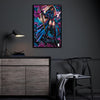
How RGB Lightbox Frames Work: The Complete Collector's Guide
, 9 min reading time
, 9 min reading time
RGB lightbox frames backlight a printed panel with LED lighting to create a glowing, cinematic display effect.
RGB lightbox frames backlight a printed panel with LED lighting to create a glowing, cinematic display effect. The image is printed on a translucent panel — usually acrylic or a diffusion film — and the LEDs behind it illuminate the print from within. The result looks fundamentally different from standard wall art: the image appears to glow rather than reflect, and the colors read with a depth and intensity that no front-lit format can match.
Lightbox frames are a strong choice for gaming rooms, streaming setups, and collector spaces where visual impact is the priority. They are not the right choice for every room or every type of art.
The core mechanism is edge-lit or back-lit LED illumination behind a translucent printed panel. Most consumer lightbox frames use edge lighting — LEDs run along the inside edges of the frame and light diffuses across the panel from the sides. Higher-end frames use full back-lighting, where LEDs cover the entire back surface of the frame for more even illumination.
The printed panel sits in front of the light source. Because the panel is translucent rather than opaque, light passes through it rather than reflecting off it. That's the key difference between a lightbox and a standard print: a standard print is viewed by reflected light, a lightbox is viewed by transmitted light. Transmitted light is how screens work. It's why screens look vivid in a dark room in a way that posters never do.
The RGB element refers to the color of the LEDs. Most lightbox frames offer a range of LED colors — white for a clean, neutral backlight, and RGB options that let you shift the backlight color to complement the art or match the room's lighting setup. A frame with a cool blue backlight behind a space-themed print reads very differently than the same print with a warm white backlight.
Not all lightbox frames are built the same way. The quality of the finished display depends on several factors that vary significantly between brands and price points.
The translucent panel that holds the printed image is the most important component. A low-quality panel will show hot spots — areas where the LEDs are visible as bright points rather than diffusing evenly across the surface. A good panel diffuses the light evenly so the entire image is illuminated consistently from edge to edge.
Edge-lit frames with low LED density show uneven illumination — brighter at the edges, darker toward the center. Full back-lit frames with high LED density produce the most even illumination but cost more. For most collector displays, a high-quality edge-lit frame is sufficient. For large format pieces where center illumination matters, back-lit is worth the premium.
The printed panel needs to be produced at high resolution. Lightbox illumination is unforgiving — it reveals pixelation, banding, and color inconsistencies that might not be visible on a front-lit print. A print that looks acceptable as a standard poster can look poor in a lightbox if the resolution isn't there.
The frame itself needs to hold the panel flat and seal the edges so light doesn't bleed out around the sides. Light bleed around the frame edges is a common quality issue with cheaper lightbox frames and it significantly reduces the visual impact of the display.
Most RGB lightbox frames include a remote or app control for switching between backlight colors and brightness levels. The range of colors and the smoothness of the transitions between them vary between brands. A frame with 16 million color options sounds impressive but is only useful if the controller is intuitive enough to actually use.
Both formats create strong visual impact, but they do it differently and suit different contexts.
A standard acrylic print is passive — it responds to the ambient light in the room. In good indirect lighting, it looks exceptional. In a dark room, it looks like any other wall art. A lightbox frame is active — it generates its own light. In a dark room, it glows. In a bright room, the backlight competes with ambient light and the effect is less pronounced.
That makes lightbox frames particularly well-suited to gaming rooms and streaming setups where the room is often darker and the display is meant to be a visual centerpiece. Standard acrylic prints perform better in rooms with good ambient lighting where the depth and color of the format can be fully appreciated.
The two formats also suit different art types. Lightbox frames work best with art that has strong contrast between dark backgrounds and bright foreground elements — the backlight makes the bright elements glow while the dark areas stay dark. Art with lighter, more even backgrounds can look washed out in a lightbox because the backlight illuminates the entire panel uniformly.
The art types that perform best in lightbox frames share a common characteristic: strong contrast between dark and light areas.
Space scenes, night cityscapes, and cosmic backgrounds work exceptionally well because the dark background stays dark while stars, energy effects, and character highlights glow. Anime art with dark backgrounds and bright energy effects — Dragon Ball Z power-ups, Naruto chakra auras, Demon Slayer breathing effects — is among the strongest performing content in lightbox format.
Art with predominantly light or mid-tone backgrounds performs less well. The backlight illuminates the entire panel, which can flatten the contrast and make the image look less defined than it would as a standard print.
Gaming rooms are the natural home for lightbox frames. The setup typically involves controlled or low ambient lighting, RGB peripherals that create a colored light environment, and a display philosophy built around visual impact rather than subtlety.
A lightbox frame integrates naturally into that environment. The backlight can be color-matched to the room's RGB setup — blue to match a cool-toned gaming setup, red for a more aggressive aesthetic, white for a clean neutral look. The frame becomes part of the room's lighting design rather than just a piece of wall art hanging on it.
For gaming room setups, the most effective placement is usually behind or beside the monitor — in the viewer's peripheral vision during gameplay, fully visible when looking away from the screen. A lightbox frame in that position creates a visual anchor for the room without competing with the monitor during active use.
Lightbox frames are available in a range of sizes, but the format rewards larger dimensions more than standard prints do. The glow effect is more impactful at larger sizes — a 12x18 lightbox frame reads as a glowing accent piece, while a 24x36 reads as a statement display.
Placement matters more for lightbox frames than for standard prints because the frame generates light. Avoid placing a lightbox frame directly adjacent to a window or in a position where strong ambient light hits the panel face-on — the backlight effect is diminished when it has to compete with bright ambient light. The format performs best in spaces where the ambient light level can be controlled.
An RGB lightbox frame is a display frame that backlights a printed panel with LED lighting. The image is printed on a translucent panel and the LEDs illuminate it from behind, creating a glowing effect. RGB refers to the color range of the LEDs, which can be adjusted to complement the art or the room.
Yes — gaming rooms are one of the strongest use cases for lightbox frames. The format integrates well with RGB lighting setups, performs best in controlled or low ambient light, and creates the kind of visual impact that suits a gaming or streaming space.
Art with dark backgrounds and bright foreground elements performs best. Space scenes, cosmic backgrounds, and anime art with energy effects and power auras are among the strongest performing content types. Art with predominantly light backgrounds can look washed out in a lightbox.
An acrylic print is passive — it reflects ambient light. A lightbox frame is active — it generates its own light. Acrylic prints perform best in rooms with good ambient lighting. Lightbox frames perform best in darker, controlled environments where the backlight effect can be fully appreciated.
Edge-lit frames are more affordable and sufficient for most collector displays. Back-lit frames produce more even illumination across the full panel surface and are worth the premium for large format pieces where center illumination matters.
The image needs to be printed on a translucent panel at high resolution. Standard opaque prints don't work in lightbox frames. The print resolution matters more for lightbox than for standard formats because the backlight reveals quality issues that front-lit prints can hide.
Fan art by independent artists. Not affiliated with or endorsed by the rights holders of any featured franchises.

Open the product to see the current sizes, format choices, price, and display requirements.


