
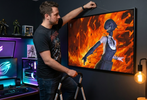
How to Build the Ultimate Gaming Room with Wall Art
, 12 min reading time
, 12 min reading time
The right wall art transforms a gaming room from a functional space into a collector display.
The right wall art transforms a gaming room from a functional space into a collector display. The format that suits gaming rooms best is acrylic — the glossy surface interacts with RGB lighting in a way that canvas and metal don't, and the depth and color intensity of the format match the visual energy of a gaming setup. Metal works well for supporting pieces and darker art. Canvas is rarely the right choice for a gaming room.
The most common mistake is buying too small. Gaming rooms reward large-format anchor pieces — 24x36 minimum for the main wall, with supporting pieces scaled to match.
A gaming room without wall art is a room with equipment in it. Wall art is what makes it a space — something that reflects who you are as a collector and a fan, not just what hardware you own.
The best gaming room setups use wall art the way interior designers use it in any other room: as the visual anchor that everything else is arranged around. The monitor, the desk, the chair, the lighting — all of it reads differently when there's a strong piece of wall art defining the space behind it.
For gaming rooms specifically, wall art also serves a practical function during streaming and video calls. A well-chosen piece behind the setup tells viewers immediately what kind of collector they're watching. It's a signal, not just decoration.
Acrylic is the strongest format for gaming rooms because of how it interacts with light. The glossy surface catches and reflects ambient light — including RGB lighting from peripherals, LED strips, and monitor backlighting. As the room's lighting shifts and changes during a session, the acrylic surface responds to it. The piece feels alive in a way that canvas and metal don't.
The depth effect of acrylic also suits the visual language of gaming room art. Anime energy effects, Marvel power auras, DC hero compositions — these are images built around light and color, and acrylic amplifies both. A Dragon Ball Z acrylic print with Goku's Super Saiyan aura in a room with warm RGB lighting is a fundamentally different experience from the same image on a poster.
Use acrylic for the anchor piece — the main wall behind or beside the monitor, the piece that defines the room.
Metal works well as a supporting format in gaming rooms. The precision and contrast of dye-sublimated metal suits darker art — villain pieces, space scenes, high-contrast graphic compositions — that might be too intense as the anchor piece but work well as flanking or side-wall pieces.
Metal also handles the physical demands of a gaming room better than canvas. It's smooth, moisture-resistant, and doesn't require the same care as canvas. For pieces on side walls or in positions where they might get bumped or touched, metal is the more practical choice.
STG canvas has a gloss finish with a woven texture. It can still reflect windows and lights, so test the position from your normal viewing angle rather than treating canvas as glare-free.
Every strong gaming room setup starts with an anchor piece — the single most important piece of wall art in the room, usually positioned behind or beside the monitor where it's visible during gameplay and fully visible when looking away from the screen.
The anchor piece should be large. 24x36 is the minimum for a room where the monitor is the primary focal point. 30x40 or larger works well for rooms with more wall space. Use painter's tape to mark the dimensions on the wall before ordering — what looks large on a product page often looks smaller than expected on an actual wall.
Choose the anchor piece first. Everything else in the room — supporting pieces, lighting, peripheral placement — should be arranged around it.
Supporting pieces flank the anchor or occupy side walls. They should be smaller than the anchor — typically one size down — and in the same format for visual coherence. A room with an acrylic anchor and acrylic supporting pieces reads as a collection. A room with mixed formats reads as an accumulation.
Supporting pieces work well as character pairs or thematic complements to the anchor. If the anchor is a Spider-Man piece, supporting pieces might be Venom and Miles Morales — characters from the same universe that extend the story the anchor starts.
The wall directly behind the monitor is the most visible position in the room during streaming and video calls. A piece in this position needs to work at the distance the camera captures it — which means strong contrast, clear subject matter, and a format that reads well in video compression. Acrylic in this position catches the monitor's backlight and creates a subtle glow effect that reads well on camera.
Avoid pieces with very fine detail in the behind-monitor position — the detail gets lost at camera distance. Bold compositions with strong silhouettes and clear focal points work best.
Side walls are where supporting pieces and metal prints work well. These positions are visible when looking away from the monitor and during room tours, but they're not the primary focal point during active gameplay. Use them for pieces that reward close attention — detailed compositions, character studies, ensemble pieces with multiple characters to discover.
Anime is the strongest category for gaming room wall art because the visual language of the genre — bold color, energy effects, strong contrast — aligns naturally with the aesthetic of a gaming setup. Dragon Ball Z, Naruto, Demon Slayer, My Hero Academia, and Jujutsu Kaisen all produce pieces that work exceptionally well in gaming rooms.
The pieces that perform best in gaming rooms are the ones with dark backgrounds and bright foreground elements — a character powering up against a dark sky, an energy effect radiating outward from a central figure. These compositions interact with RGB lighting in ways that lighter, more evenly-toned pieces don't.
Marvel wall art works well in gaming rooms because the franchise's visual language is built around power, action, and spectacle — the same qualities that define a strong gaming room aesthetic. Spider-Man mid-swing, Iron Man in full armor, the Avengers assembled — these are images with the scale and energy that gaming rooms reward.
Hero pieces work best as anchor art. Villain pieces — Thanos, Venom, Carnage — work well as supporting pieces or side-wall art where their intensity complements rather than dominates the room.
DC wall art brings a different visual register to gaming rooms — darker, more cinematic, more atmospheric than Marvel's primary-color heroism. Batman's Gotham, Superman's cape against a stormy sky, Wonder Woman's warrior stance — DC pieces tend to have more visual weight and suit rooms where the aesthetic leans darker and more serious.
DC villain art — Joker, Darkseid, Deathstroke — is particularly strong for gaming rooms because the visual character of the antagonists suits the format and the space.
Transformers wall art is a natural fit for gaming rooms because the franchise's visual language is mechanical, precise, and built around scale. Optimus Prime and Megatron as a paired display, the Autobot and Decepticon insignias rendered at large format, the full roster assembled — these are pieces that suit the technical aesthetic of a gaming setup in a way that few other franchises match.
RGB lighting and acrylic wall art are a natural combination. The glossy surface of acrylic catches colored light and reflects it back into the room, which means the piece changes character as the lighting changes. A piece with a cool blue backlight reads differently than the same piece under warm amber lighting — and both read differently than the piece in natural daylight.
A few things worth knowing about RGB lighting and wall art placement:
Gaming rooms consistently reward larger formats than collectors initially plan for. The most common feedback from buyers is that they wish they'd gone one size larger.
Use painter's tape to mark the dimensions on the wall before ordering. The tape test almost always reveals that the size you were planning is smaller than it looks on the wall, and the size you thought was too large is actually right.
The gaming room setups that get the most attention — in person at conventions and online in collector communities — share a few consistent characteristics: a large acrylic anchor piece, consistent format across supporting pieces, and RGB lighting that complements rather than competes with the art.
The setups that don't work as well tend to have the same issues: pieces that are too small for the wall space, mixed formats that create visual inconsistency, and lighting that washes out the art rather than enhancing it.
The single most impactful upgrade most gaming rooms can make is replacing a 16x20 poster with a 24x36 acrylic print in the anchor position. The difference in visual impact is not proportional to the size difference — it's significantly larger.
Acrylic is the strongest format for gaming rooms. The glossy surface interacts with RGB lighting, the depth and color intensity suit the visual energy of a gaming setup, and the format creates the kind of visual impact that gaming rooms reward. Metal works well for supporting pieces and darker art. Canvas is rarely the right choice for a gaming room.
24x36 minimum for the anchor piece in a medium gaming room. Use painter's tape to mark the dimensions on the wall before ordering — the tape test almost always reveals that the planned size is smaller than it looks on the wall.
Choose the character and composition that mean the most to you, then compare the available finishes and sizes. These are editorial display suggestions, not claims based on measured sales or search demand.
Yes, but stay consistent on the main wall. An acrylic anchor with metal supporting pieces on side walls works well. Mixing acrylic and canvas on the same wall creates visual inconsistency that's hard to resolve.
The glossy surface of acrylic catches and reflects colored light, which means the piece changes character as the room's lighting changes. Indirect RGB light creates a luminosity effect. Direct RGB light hitting the face of the acrylic creates reflection. Position acrylic pieces to catch indirect light for the best result.
Yes — gaming rooms are one of the strongest use cases for lightbox frames. See How RGB Lightbox Frames Work for the full breakdown.
Fan art by independent artists. Not affiliated with or endorsed by the rights holders of any featured franchises.


Open the product to see the current sizes, format choices, price, and display requirements.


